
Simulate Engineering Concepts Instantly with ForceEffect
Overview
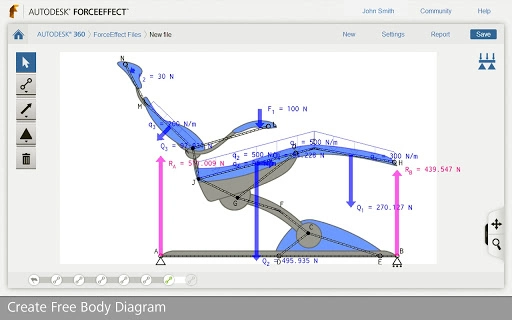
Autodesk ForceEffect™ is a desktop and web-based engineering application designed to simplify the early-stage design process by enabling real-time simulation of mechanical systems. It empowers engineers, students, and designers to analyze static systems using free body diagrams without relying on traditional paper-and-pencil methods. The software is particularly useful during the concept phase, where rapid iteration and validation of design viability are critical. By integrating simulation and engineering calculations directly into the user interface, it reduces the time required to evaluate multiple design options.
Target users include mechanical engineers, engineering students, and technical professionals involved in structural or mechanical design. The tool supports both field and office use, making it suitable for on-site concept evaluation and classroom instruction. It allows users to sketch, constrain, and simulate systems with intuitive controls, providing immediate feedback on forces, moments, and equilibrium. The ability to import background images and export results via DWG files supports a seamless workflow into downstream CAD processes.
The developer, Autodesk, is a well-established name in design and engineering software, known for its robust tools across industries. While specific details about the development team or company history were not provided, the software's integration with Autodesk 360 and support for industry-standard file formats suggest a focus on interoperability and professional utility.
Key Features & Capabilities
- Real-time simulation – Instantly solve static systems and receive immediate feedback on reaction forces, moments, and equilibrium conditions.
- Freehand sketching with intelligent snapping – Draw elements and construction lines with automatic alignment and constraint inference.
- Comprehensive constraint system – Create pinned, welded, fixed, sliding, and grounded supports with precise control over system behavior.
- Dynamic load and moment application – Add known, unknown, and distributed loads, as well as moments, to evaluate system responses.
- Interactive dimensioning and scaling – Adjust object sizes globally and apply unit-specific dimensions for accurate modeling.
- Weight assignment to elements – Assign mass to individual components to simulate real-world loading conditions.
- Force vector visualization – Toggle between full and component force displays for clearer analysis.
- Results reporting – Generate detailed reports including diagrams, numerical results, and all governing equations.
- File management and sharing – Save and load projects via Autodesk 360, and export files through DWG and email for collaboration.
- Background image import – Use reference images to guide sketching and ensure design accuracy.
These features enable users to quickly validate design assumptions, test multiple configurations, and document findings efficiently. For example, a student can sketch a truss structure, apply loads, and instantly see reaction forces. An engineer can use a photo of a physical prototype as a background to digitize and analyze its behavior. The tool’s ability to handle both determinate and indeterminate systems broadens its applicability across diverse engineering tasks.
User Interface, Workflow & Performance
The user interface of Autodesk ForceEffect is designed for simplicity and direct interaction. Navigation is handled through a clean, icon-based toolbar that provides access to sketching, constraint, load, and analysis tools. Users can select objects by clicking and manipulate them via drag, rotate, and scale actions, minimizing the need for complex menus or keyboard shortcuts.
Workflow efficiency is enhanced by the software’s real-time solving engine, which recalculates forces and reactions as changes are made. This immediate feedback loop supports rapid prototyping and iterative design. The interface also includes a built-in help system to guide users through unfamiliar functions, reducing the learning curve.
Performance details were not specified by the developer. However, given that the software operates in a browser environment and supports Windows, Mac, and web platforms, it is likely optimized for moderate hardware configurations. The 200MB installation size suggests a lightweight footprint, though exact CPU and RAM usage were not disclosed. Stability is expected to be consistent with Autodesk’s standard for web-based tools, particularly when used with a stable internet connection.
Compatibility & System Requirements
Autodesk ForceEffect is compatible with Windows, Mac, and web-based platforms, allowing users to access the application across multiple devices. The software version is 2.0.1, released on March 15, 2024. Installation size is 200MB, which indicates a moderate footprint for a full-featured engineering tool.
Exact system requirements were not listed by the developer. General compatibility with modern browsers and operating systems is assumed, but specific hardware specifications such as minimum RAM, processor speed, or GPU support were not provided. Users are advised to ensure their system meets the baseline requirements for running a web application with interactive graphics and real-time computation.
Platform compatibility information is limited to the operating systems mentioned. No support for Linux or mobile devices was indicated. For users relying on offline functionality, the software may require periodic internet access due to cloud integration with Autodesk 360.
Pros and Cons
Pros
- Real-time simulation and immediate feedback for faster design iteration
- Intuitive, click-and-drag interface suitable for beginners and professionals
- Supports both determinate and indeterminate structural systems
- Seamless integration with CAD workflows via DWG exports
- Free access with no cost barrier for students and educators
- Background image import for accurate reference-based design
- Comprehensive results reporting with equations and visual diagrams
- Cloud-based file storage and sharing via Autodesk 360
Cons
- Exact system requirements not disclosed by the developer
- Performance behavior under heavy load not specified
- Dependent on internet connection for full functionality
- Limited to static systems analysis; not suitable for dynamic or thermal simulations
- No native mobile app for on-the-go use
- Learning curve may exist for users unfamiliar with free body diagrams
FAQ Section
Is Autodesk ForceEffect free to use?
Yes, the software is available at no cost. It is offered as a free tool for engineering education and concept design.
Can I use ForceEffect offline?
While the application is web-based, limited offline functionality may be available through cached sessions. However, full access to features like file saving and sharing via Autodesk 360 requires an active internet connection.
What operating systems does ForceEffect support?
ForceEffect is compatible with Windows, Mac, and web browsers. No native support for Linux or mobile platforms was indicated.
Is the software secure to download and use?
As a product developed by Autodesk, ForceEffect is distributed through official channels. Users are advised to download only from verified sources to ensure security.
How often are updates released?
Updates are released periodically by Autodesk to improve functionality and stability. The current version is 2.0.1, released on March 15, 2024.
Final Thoughts
Autodesk ForceEffect stands out as a powerful, accessible tool for engineers and students engaged in early-stage design and static analysis. Its ability to transform freehand sketches into fully simulated systems with real-time calculations offers a significant advantage over traditional methods. The intuitive interface, combined with robust features like force vector visualization and detailed reporting, makes it ideal for both educational use and professional concept validation.
While the lack of detailed system requirements and performance data limits full transparency, the software’s lightweight size and web-based nature suggest broad accessibility. Its integration with industry-standard CAD formats ensures that concepts developed in ForceEffect can be easily advanced into detailed design phases.
For anyone involved in mechanical or structural design, especially during the concept stage, this tool delivers tangible value. Whether you're a student learning free body diagrams or a professional testing design ideas on the fly, Autodesk ForceEffect provides a streamlined, efficient workflow.
Download Autodesk ForceEffect now







